I have previously built cellular gateways for Asterisk out of EC20 and EG25 modules (Using EC20 Module, Asterisk, and FreePBX for SMS Forwarding and VoIP, Connecting a DJI/Baiwang Enhanced Transmission Module to Asterisk and Telegram SMS Bots), and used Flexisip to fix SIP clients missing calls in the background (Adding SIP Push to Asterisk/FreePBX with Flexisip and a Custom Linphone Build). One piece was still missing: some SIM cards simply do not work well in a module, and the easiest fix would be to let an ordinary Android phone act as the gateway itself.
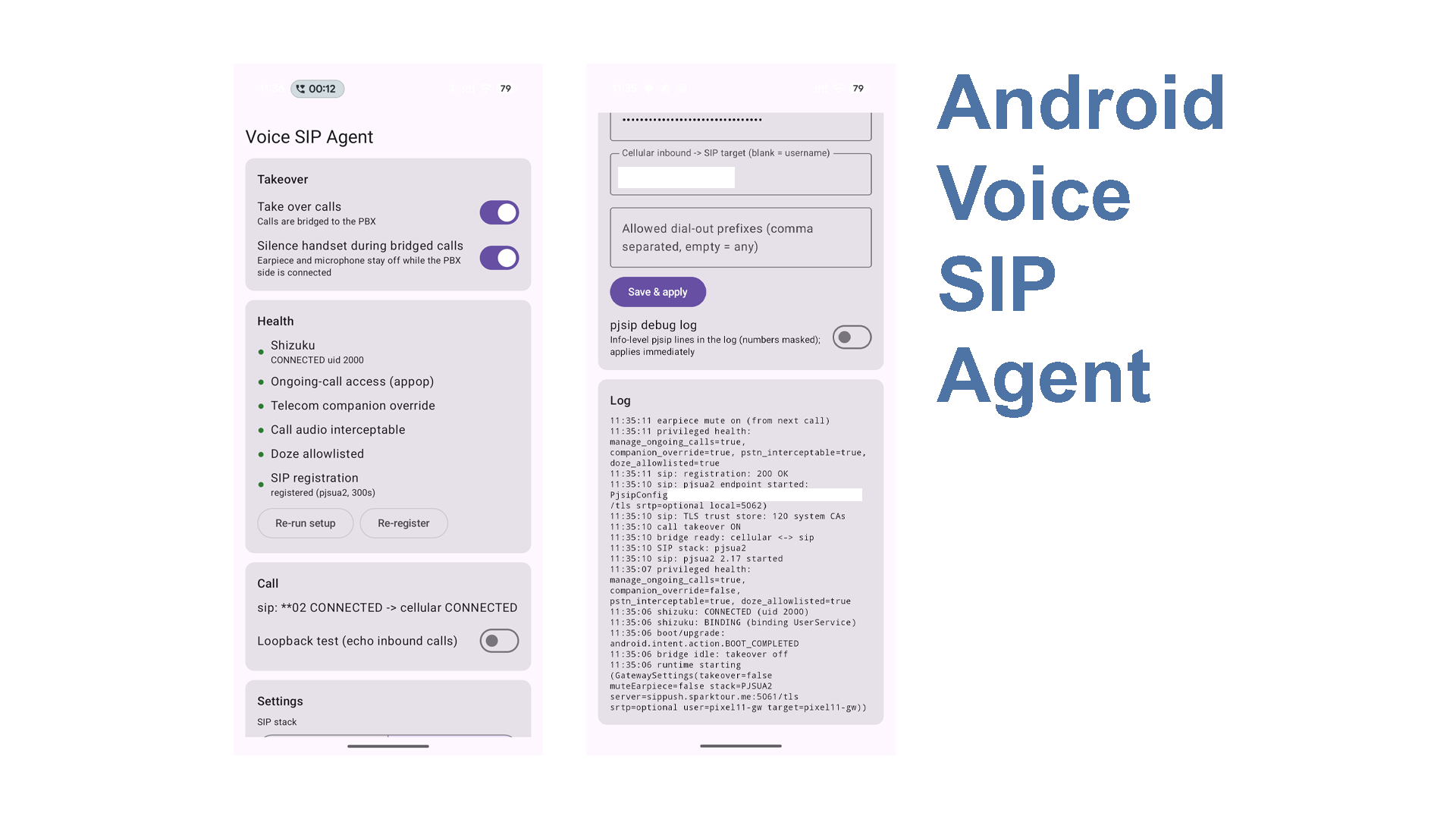
In this post, with help from an LLM (Claude), I wrote an app called Voice SIP Agent. It lets an unrooted Android phone register to Asterisk/FreePBX/Issabel as a trunk: incoming cellular calls are sent to an extension on the PBX, calls dialed from an extension go out through the phone’s cellular connection, and audio, DTMF and hangups are mapped in both directions. Meanwhile, the Google Phone app on the device keeps working as usual. This post explains how the app forwards calls, and how it was developed.
Why Build a Phone-Based Gateway
A 4G module actually makes a good gateway: it has no battery, never needs to be unlocked, and has no background-process restrictions to fight, so it can sit plugged into a small PC unattended year-round. After a few years of use, however, I ran into a few problems that are hard to work around:
- IMEI whitelists: some carriers (especially in the US) only allow certified devices on VoLTE. If the module’s IMEI is not on the list, even if it gets data, it cannot make calls. With 3G shut down, no VoLTE essentially means no calls at all.
- VoLTE/VoWiFi configuration: modules ship with very few carrier profiles (MBNs). When the right one is missing, you have to dig it out of phone firmware yourself, as in Extracting MBNs from Xiaomi Firmware to Add VoLTE Carrier Profiles to Quectel EC20/EG25 Modules, and it does not always work. A modern phone, on the other hand, receives its configuration directly from the carrier, so VoLTE, VoWiFi and eSIM all get set up correctly.
So my requirements were:
- A standard Android phone (Pixel, moto, etc.), no root, no custom ROM;
- The phone registers to my existing Issabel as a SIP trunk, and both incoming and outgoing calls follow the PBX’s routes;
- The default phone app is not replaced, so the phone remains usable as a daily phone;
- It can reach the PBX over the Internet through my existing Flexisip (TLS + SRTP).
Alternatives I Looked At
Bluetooth Hands-Free + chan_mobile
Asterisk’s chan_mobile makes a Linux machine pose as a Bluetooth car kit, answering, dialing and carrying audio over HFP. Every phone supports it, and nothing needs to be installed on the phone. The trade-offs are that audio quality is limited by HFP’s codecs, the link is sensitive to distance and to the stability of the Bluetooth stack, and the phone’s Bluetooth is permanently occupied.
Carrier Call Forwarding
Unconditionally forwarding calls to a VoIP number is the easiest option. But it only handles incoming calls and cannot be used to place calls from that SIM; forwarded calls are usually billed separately, and the caller ID may be lost. For users in the US, there is a very convenient option: Google Fi web calls, which works much like Google Voice: you can make and receive calls on the web without pairing a phone at all, which covers everything I have wanted from my SIP posts over the past few years.
Apps That Need Root
The closest project on GitHub is gsm2sip, which is also a cellular↔SIP gateway for Android and can even forward SMS as SIP MESSAGE. However, it requires Magisk + LineageOS, is installed as a system app, and reads and writes the mixer paths of the Qualcomm audio DSP directly, which ties it closely to each device’s vendor image.
AirSIM
AirSIM was the first project I saw that could relay a phone’s call audio without root: it uses Shizuku to read and write call PCM as the shell user, and forwards calls from an Android phone to an iPhone or Apple Watch. But it does not speak SIP, and it can only pair with an iPhone. Reading its code was what got me started.
Android’s Built-In SIP
Android used to ship android.net.sip, but it was deprecated in Android 12. It was only ever a SIP client anyway and never had the ability to bridge cellular calls.
In short, I could not find anything that was unrooted, worked on standard Android, connected to my own PBX, and left the phone usable day to day, so I decided to write it myself.
How It Works, Part 1: Why Ordinary Apps Cannot Touch Call Audio
On a modern phone, call audio mostly does not go through the regular audio path on the application processor. The audio of a VoLTE call is encoded and decoded by the baseband (modem), which connects through the audio DSP straight to the earpiece and microphone:
     Far end ◄──── carrier network ────► baseband (modem)
                                           │  telephony-rx / telephony-tx
                                           ▼
                                   audio DSP (audio HAL)
                                  ┌────────┴────────┐
                                  ▼                 ▲
                              earpiece          microphone

     AudioFlinger on the application processor (apps' AudioRecord/AudioTrack)
     can only join this path if the audio HAL declares extra routes
Once a call is set up, the audio HAL creates an “audio patch” between devices: telephony-rx goes to the earpiece and the microphone goes to telephony-tx. An ordinary app using AudioRecord can only record the microphone. For the call audio sources VOICE_CALL, VOICE_DOWNLINK and VOICE_UPLINK, the audio policy requires the caller to hold CALL_AUDIO_INTERCEPTION (or, for legacy reasons, CAPTURE_AUDIO_OUTPUT), both of which are system-level permissions (AudioPolicyInterfaceImpl.cpp). This is why third-party call recorders have long had to rely on workarounds such as recording the microphone.
So does the phone have a hardware path that can bring call audio out? You can check in the audio policy:
adb shell dumpsys media.audio_policy | grep -iE "telephony|in-call|incall"
My Pixel 11 Pro shows two routes:
| Direction | Route | Meaning |
|---|---|---|
| Downlink (far end’s voice) | telephony-rx → in-call-capture | The far end’s voice can be recorded from the call |
| Uplink (voice sent to the far end) | in-call-playback (INCALL_MUSIC) → telephony-tx | Audio can be played into the call |
In the mix rule for telephony-tx, the microphones are sources too, alongside in-call-playback. In other words, injected audio is mixed with whatever the phone’s microphone picks up before being sent to the far end. This needs special handling later.
How It Works, Part 2: Android 13’s Call Audio Interception API
A hardware path is not enough; there also has to be a software interface. Android 13 (API 33) added a set of system APIs (SystemApi) for call audio interception. According to the comments in AOSP, they are meant for features such as call screening and call audio redirection, and are reserved for privileged system apps (see AudioManager.java):
| API | Purpose | Source |
|---|---|---|
AudioManager.isPstnCallAudioInterceptable() | Whether the device hardware supports intercepting cellular call audio | AudioManager, AudioService |
AudioManager.getCallDownlinkExtractionAudioRecord(format) | Creates an AudioRecord that captures the downlink (far end’s voice) | AudioManager |
AudioManager.getCallUplinkInjectionAudioTrack(format) | Creates an AudioTrack that injects audio into the uplink | AudioManager |
AudioManager.CALL_REDIRECT_PSTN | The “call redirection” mode used internally by the two objects above (hidden constant) | AudioManager |
AudioManager.MODE_CALL_REDIRECT | The audio mode used while a call is redirected (public constant; used later to silence the phone itself) | AudioManager |
In AudioService, isPstnCallAudioInterceptable() really just checks whether the audio policy contains both a TELEPHONY_TX and a TELEPHONY_RX device, i.e. the two routes from the previous section.
These APIs require the CALL_AUDIO_INTERCEPTION permission (protection level signature|privileged|role, declaration) and can only be created during a call (MODE_IN_CALL), so ordinary apps cannot use them. But the shell user (uid 2000) happens to hold it (see the Shell package’s AndroidManifest.xml), together with CAPTURE_AUDIO_OUTPUT, MODIFY_PHONE_STATE and MODIFY_AUDIO_ROUTING, which are needed later:
adb shell dumpsys package com.android.shell | grep -E "CALL_AUDIO_INTERCEPTION|CAPTURE_AUDIO_OUTPUT|MODIFY_PHONE_STATE|MODIFY_AUDIO_ROUTING"
In other words, any code that runs as the shell user can read and write call audio through interfaces the system itself provides, without root and without touching vendor-specific mixers. The whole app rests on this.
How It Works, Part 3: Reading and Writing Call Audio as Shell with Shizuku
What Shizuku Is
Shizuku uses wireless debugging (or a one-time adb connection) to start a long-running process as the shell user, and shares its Binder with other apps. An app can register a UserService, which Shizuku launches as an app_process running as shell to execute the app’s own code. All privileged code therefore lives in this shell process, while the rest stays in the ordinary app process:
┌──────────────────── App process (regular app uid) ────────────────────┐
│  SIP (pjsua2 / home-grown stack)                                       │
│  CallBridge: call state machine, who answers first, who hangs up first │
│  Companion InCallService: answer, hang up, DTMF, mute, dial            │
└───────────────────────────────┬────────────────────────────────────────┘
                                │ Binder (AIDL) + socketpair (PCM, one 20 ms frame per packet)
┌───────────────────────────────┴────────────────────────────────────────┐
│  Shizuku UserService (shell uid 2000)                                   │
│   ├─ setup: appops, Telecom companion override, Doze allowlist          │
│   └─ CallAudioTap: downlink AudioRecord → socket, socket → uplink track │
└─────────────────────────────────────────────────────────────────────────┘
The privileged part is kept as small as possible: the shell process only reads and writes audio and runs a few cmd/appops settings, while SIP, the state machine and the UI live in the ordinary process.
PCM is handed to the app over a SOCK_SEQPACKET socketpair, one frame per packet (8 kHz, mono, 16-bit, 20 ms, i.e. 320 bytes), which lines up naturally with G.711 frames and needs no resampling. One end of the socketpair is passed to the app over Binder as a ParcelFileDescriptor; the other stays in the shell process. Unlike opening a local TCP port, this means no other app on the device can connect to eavesdrop on or inject call audio.
Writing the code, though, ran into two pitfalls that cost me time.
Pitfall 1: Caller Identity (Attribution)
Helpers such as getCallDownlinkExtractionAudioRecord call new AudioRecord.Builder() internally without passing a Context (source), so the caller identity is taken from the process. In Shizuku’s UserService, the process has uid 2000 but the package name is the app’s own. When AudioFlinger sees “uid 2000 + a non-shell package name”, it rejects the request with invalid attr (AudioFlinger’s attribution validation is in AudioFlinger.cpp).
The fix is to skip those helpers, build a Context attributed to com.android.shell yourself, and pass it explicitly to AudioRecord.Builder/AudioTrack.Builder:
private class ShellContext(base: Context) : ContextWrapper(base) {
    override fun getPackageName() = "com.android.shell"
    override fun getOpPackageName() = "com.android.shell"
    override fun getAttributionSource(): AttributionSource =
        AttributionSource.Builder(2000).setPackageName("com.android.shell").build()
}
Pitfall 2: Audio Attributes Must Match the Framework Exactly
After building AudioRecord/AudioTrack myself, I hit a subtler problem: the objects were created, frames flowed at 50 per second, and Telecom state looked perfectly normal, yet the far end could not hear the injected audio, and what was recorded was not the far end’s voice either. In fact, the record had silently fallen back to the microphone, and the track was being played as media through the phone’s own speaker.
The cause was that, besides setting CALL_REDIRECT_PSTN, the helpers also set specific audio attributes (uplink, downlink), and every one of them is required:
// Downlink: capture preset must be VOICE_DOWNLINK(3)
val recAttr = AudioAttributes.Builder()
    .also { setInternalCapturePreset(it, MediaRecorder.AudioSource.VOICE_DOWNLINK) } // hidden API, via reflection
    .build()
// Uplink: system usage must be USAGE_CALL_ASSISTANT(17), content type SPEECH
val trackAttr = AudioAttributes.Builder().setContentType(AudioAttributes.CONTENT_TYPE_SPEECH)
    .also { setSystemUsage(it, 17) }                                                // hidden API, via reflection
    .build()
// Both also call setCallRedirectionMode(CALL_REDIRECT_PSTN)                         // hidden API, via reflection
During automated testing, this problem was nearly invisible in the logs. I finally tracked it down by adding level statistics in the shell process every 5 seconds (only peak levels and the number of “voiced” frames, never the audio itself), plus a real person listening on a second phone.
The Device Is the Source of Truth
These hidden APIs are undocumented, and material online may well not match your system version. The AOSP source on cs.android.com is a good starting point (every link in this post is pinned to a commit on the main branch at the time of writing), but vendor builds do not always match AOSP main, so in the end I treated the implementation on the phone as authoritative and disassembled the framework pulled straight from the device:
adb pull /system/framework/framework.jar
adb pull /system/framework/services.jar
unzip framework.jar 'classes*.dex' -d framework
$ANDROID_SDK/build-tools/37.0.0/dexdump -d framework/classes*.dex > framework.txt
# search framework.txt for getCallDownlinkExtractionAudioRecord, AudioService.setMode, etc.
That is how the attribute combination above was read out of the bytecode of AudioManager.getCallDownlinkExtractionAudioRecord.
How It Works, Part 4: Controlling Calls Without Being the Default Phone App
Audio alone is not enough: the gateway also has to answer, hang up, send DTMF and place calls. On Android, the way to get full Call objects is an InCallService, and the usual approach is to make the app the default phone app (which is what AirSIM does). But then the UI for every call is handed to that app, and Google Phone’s incoming-call screen, call screening, call recording and so on stop working, so the phone is no longer usable day to day.
Fortunately, Telecom also has a “companion” InCallService, originally intended for devices like smartwatches: it gets Call objects just like the default phone app, but does not take over the call UI. To have Telecom bind a third-party companion app, three things are needed:
| Requirement | Level | How to obtain |
|---|---|---|
CALL_COMPANION_APP | Normal permission (since Android 9) | Declared in the manifest |
MANAGE_ONGOING_CALLS | Signature or appop (since Android 12) | Shell runs appops set <package> MANAGE_ONGOING_CALLS allow |
| Telecom companion override | A test-only Telecom shell command (TelecomShellCommand.java) | Shell runs cmd telecom add-or-remove-call-companion-app <package> 1 |
In my first probe tests I had only declared the first one, and when Telecom checked MANAGE_ONGOING_CALLS during the call (InCallController.java), it skipped my test app (the log showed the watch’s companion app being skipped as well). Once all three were in place, the test app could answer, mute, send DTMF and hang up without being the default phone app.
A few details:
- The companion override is lost on reboot or when the Telecom process restarts: in the source, it is just an
ArrayListin the Telecom process’s memory (RoleManagerAdapterImpl.java). So the app re-checks it on every start and runs a health check every 60 seconds. - Also because it is a plain list, adding twice creates a duplicate entry and each removal deletes only one, so the setup code has to count the existing entries first.
- It only takes over its own calls: only gateway inbound calls and calls the gateway itself placed (matched on the last 8 digits) are handled. Calls the user dials by hand, and a second call arriving while one is already in progress, are left to the system.
- Emergency numbers are always refused and are never dialed from the SIP side.
- Outgoing calls use the public
TelecomManager.placeCall(), and answering, hanging up and DTMF use public methods onCall. These APIs have barely changed since Android 6 and are the most stable part of the whole app.
Keeping the Phone Itself Quiet
While the gateway is bridging a call, the phone should neither send its surroundings to the far end nor play the far end’s voice through the earpiece. That takes two steps:
InCallService.setMuted(true): as mentioned above,telephony-txmixes in the microphone. In testing, muting removes the microphone from the uplink completely (I recorded the uplink on the Pixel: the RMS during mute was 1), while injected audio is unaffected, which is exactly what a gateway needs.- Switching the audio mode from
MODE_IN_CALLtoMODE_CALL_REDIRECT: the audio policy then tears down the baseband↔earpiece/microphone audio patches, while the redirectedAudioRecord/AudioTrackkeep working, so nothing comes out of the earpiece. AudioService only lets callers holdingMODIFY_PHONE_STATErequest this mode (AudioService.setMode); shell happens to hold it, and its newer mode request takes precedence over Telecom’sIN_CALL. When the call ends, setting the mode back toNORMALwithdraws the request. AudioService also registers a death recipient for every process that requests a mode (SetModeDeathHandler), so if the shell process dies unexpectedly, its request is withdrawn automatically and the phone cannot get stuck in this mode.
AirSIM silences the earpiece with cmd audio adj-mute, but that command no longer exists on Android 17.
How It Works, Part 5: Call Flow and Clocking
Call Flow
Cellular inbound → SIP:
Incoming call ──► phone rings (Telecom: RINGING)
                    │ gateway sends INVITE sip:<DID>@pbx, caller number in P-Asserted-Identity
                    ▼
                PBX routes to an extension, which rings ◄── 180
                    │
                extension answers ◄── 200 OK
                    │ only now answer() the cellular call
                    ▼
                ACTIVE → mute → open audio tap → bridge both directions
The gateway waits for the PBX side to answer before picking up the cellular call. If nobody answers on the PBX (45-second timeout by default) or it returns an error, the phone simply rejects the call, so the caller never gets “connected to silence” and no airtime is billed.
SIP → cellular outbound:
The PBX sends an INVITE to the phone, the phone dials with placeCall, replies 180 once the call is DIALING, and replies 200 OK only once it is ACTIVE. I tested this timing specifically during the probe phase: the callee waited a few seconds after ringing before answering, and Telecom entered ACTIVE about 15.6 seconds after dialing, matching the real answer time, so ACTIVE can be trusted as “the far end has answered”. Also, the downlink is pure silence while dialing and ringing; the Pixel never sees the carrier’s ringback tone, so Asterisk generates the ringback locally.
A Single Clock Domain
Bridging audio involves two clocks: the baseband produces a downlink frame every 20 ms at its own pace, and the RTP peer sends packets on its own clock. If each side runs its own timer, they drift apart over time: buffers either keep growing (rising latency) or run dry (dropouts).
My approach is to use only one clock: the call audio tap is marked as the clock source, and every time a downlink frame is read from the baseband, one frame is moved in both directions, “downlink → SIP” and “SIP → uplink”. The RTP side has no clock of its own and relies on its jitter buffer to absorb the peer’s drift. In testing, a 15-minute call showed no noticeable latency growth or dropouts.
The SIP Side: From a Home-Grown Stack to pjsua2 and Flexisip
Connecting as a Trunk, Not an Extension
The phone is configured on the PBX as a trunk rather than an extension:
- Incoming calls enter the
from-trunkcontext and follow Inbound Routes, with no internal-extension privileges; trust_id_inbound=yesmakes the PBX trust the caller number the gateway sends inP-Asserted-Identity;remove_existing=yeslets a new registration immediately replace the old one when the phone’s IP or port changes;- Outgoing calls reach this trunk through a dedicated Outbound Route prefix (I use
9#7#).
The full pjsip_custom_post.conf and dialplan are in the project README.
Writing One First, Then Switching to pjsua2
Since I only cared about the LAN at first, I had the LLM write a minimal SIP UA in pure Kotlin: UDP, a transaction layer, Digest authentication, REGISTER, INVITE/CANCEL/BYE/re-INVITE, SDP, RTP with a jitter buffer, G.711 and RFC 4733 DTMF. It does not depend on Android, so its unit tests run directly on a computer, which made debugging fast.
For TLS + SRTP over the Internet, though, writing my own no longer made sense, so I added a pjsua2 implementation based on pjsip 2.17, which is now the default. Both implement the same CallEndpoint interface and can be switched in the settings. Key points of the pjsua2 integration:
- No Android sound-device backend is compiled in, only the null sound device. pjsua therefore never touches
AudioManageror changes the audio mode, and never fights with the call redirection above. - Audio enters and leaves pjsua’s conference bridge through a custom
AudioMediaPort(8 kHz/20 ms, no resampling, echo cancellation and VAD off), with a FIFO of at most 5 frames on each side to absorb jitter between the two clocks. - OpenSSL 3.5.8 is statically linked into
libpjsua2.so, and TLS verifies certificates against Android’s system CA store.
Reaching the PBX over the Internet via Flexisip
For the Internet side I simply reused the Flexisip from my previous post: the phone registers over TLS to Flexisip on a public VPS, which forwards requests to Issabel over WireGuard. Two problems came up:
- Wildcard certificates: my Flexisip uses a
*.sparktour.mewildcard certificate, and pjsip rejects wildcard certificates as required by RFC 5922. So I gave pjsip a small patch that accepts a*.only in the leftmost label, following the rules of RFC 6125. - Flexisip uses the Request-URI to look up its registrar: on a direct LAN connection, the PBX can put the number to dial in the Request-URI (
PJSIP/<number>@trunk). But Flexisip routes by looking up the Request-URI’s user part in its registrar, and a phone number is obviously not a registered user, so the result is a 404. The fix is to keep the gateway’s own AoR in the Request-URI and carry the number in a customX-VSA-Dialheader instead:
; extensions_custom.conf
[vsa-android-gw-out]
exten => _X.,1,Dial(PJSIP/android-gw,,b(vsa-android-gw-hdr^s^1(${EXTEN})))
exten => _X.,n,Hangup(${HANGUPCAUSE})

[vsa-android-gw-hdr]
exten => s,1,Set(PJSIP_HEADER(add,X-VSA-Dial)=${ARG1})
exten => s,n,Return()
Then create a Custom trunk in Issabel with the dial string Local/$OUTNUM$@vsa-android-gw-out. Beyond that, Flexisip needs no gateway-specific configuration at all: REGISTER is authenticated by Asterisk, incoming calls arrive over the TLS connection the phone itself opened, and the phone does not need any open ports. SRTP uses SDES and is end-to-end encrypted between the phone and Asterisk.
Appendix: Developing with an LLM
Almost all of the code was written together with an LLM in Claude Code. From reading AirSIM’s code to publishing the first release took less than two days. I think the process itself is worth writing down.
Step 1: Answer “Is This Even Possible?”
Before writing any app code, I had the LLM read AirSIM’s code, work out how it relays audio and controls calls, and judge whether those methods would work on standard Android such as a Pixel. Its assessment was cautious: the control plane would basically be fine, downlink capture would most likely work, and uplink injection was the biggest unknown, which had to be tested on a real device.
Verification was therefore split into two stages:
- Static checks without a call: use adb to see whether the audio policy has
telephony-tx/rxroutes, which permissions shell holds, and whatisPstnCallAudioInterceptable()returns.adb shellalready runs as shell, with exactly the same permissions as Shizuku, so this stage did not even need an app: the probe ran directly underapp_process. - Real call tests: I called the Pixel from a second phone. The LLM had prepared a second-by-second script that injected beeps of different frequencies (400/600/800 Hz) using different methods in different time windows, printing only downlink RMS and peak levels. I listened and talked on the second phone, then told it what I had heard.
It took five calls plus two outgoing calls in total. The first confirmed that all three beeps could be heard (uplink works). The second showed that Telecom had not bound the test app, and the logs revealed the missing MANAGE_ONGOING_CALLS. On the third, the app was bound but none of the control commands arrived, because the test script sent its broadcasts without naming a receiver. The fourth was the first time the app automatically answered, muted, sent DTMF and hung up without being the default phone app. On the fifth, to avoid relying on my ears, the uplink sent to the carrier was recorded directly on the Pixel, confirming that muting removes the microphone completely while injected audio is unaffected. The final two outgoing calls confirmed when ACTIVE fires.
All of these findings went into a design document covering the architecture, the state machine, the mapping from DisconnectCause to SIP error codes, open questions, and milestones M0 to M5 with acceptance criteria. The next session followed that document for development.
Step 2: Develop by Milestone
Development went like this:
- Project skeleton, Shizuku UserService, companion InCallService;
- An echo mode for the audio tap: an incoming cellular call has its downlink fed straight back into the uplink, so the caller hears their own echo, which verifies the audio path on its own;
- The home-grown SIP stack connected to Issabel on the LAN, with incoming calls going to extension 302 and extensions dialing
9#7#<number>to call out; - Fixing the two audio pitfalls above, and adding the “take over calls” master switch and handset muting;
- pjsua2, TLS/SRTP, Flexisip;
- Cleanup before open-sourcing: scrubbing the git history, adding release signing, choosing a license (pjsip is GPL-2.0-or-later, and together with Apache-2.0 OpenSSL the combined work can only be GPL-3.0), and writing the README.
Takeaways
- Where the LLM shines: reading an unfamiliar codebase and extracting its core logic; writing a SIP stack and state machine from the RFCs; writing NDK/SWIG/OpenSSL cross-compilation scripts; disassembling the system framework to find out how hidden APIs really work; writing unit tests. In the past, each of these would have cost me several evenings.
- What a human has to do: place calls, answer calls, listen and talk. Pitfall 2 above is a typical example: every log and counter looked normal, and only a human ear could tell the audio was going to the wrong place. Decisions such as which license to use, or whether to change the PBX and Flexisip configuration, should also be made by a human. I required the LLM to explain any PBX change and take a backup first, and to proceed only after I agreed.
- Probe first, build later: rather than asking the LLM to “write a gateway” directly, having it write probes first, knock out the key assumptions one by one on a real device, then write a design document, and only then write code, led to far less rework. Every conclusion needs evidence from logs or a real device, not “according to the API docs it should work”.
Results and Limitations
So far it has been tested on a Pixel 11 Pro (Android 17, Verizon/T-Mobile VoLTE) and a moto X40 (Android 16). Verified features:
| Feature | Status |
|---|---|
| Cellular inbound → PBX extension, extension dials out → phone places the call | ✅ |
| Two-way audio, DTMF (RFC 4733) | ✅ |
| Handset earpiece and microphone muted while bridged | ✅ |
| Wi-Fi reconnect (including mid-call) | ✅ |
| Overnight Doze standby | ✅ |
| 15-minute calls without clock drift | ✅ |
| LAN UDP, Internet TLS + SRTP through Flexisip | ✅ |
| Call waiting, DTMF and network-loss recovery under pjsua2, Internet calls over cellular data only | Not yet verified |
Current limitations:
- Shizuku has to be started by hand after a reboot: after a reboot the phone is in the locked (BFU) state, and unrooted Shizuku cannot start on its own; it has to be started manually once after unlocking. This is the biggest disadvantage compared with a 4G module, and something a phone-based gateway cannot avoid.
- Reliance on hidden APIs: the hidden methods called via reflection, the
ShellContexttrick and Telecom’s test-only shell command may all change in the next Android release. The official call audio interception API is a SystemApi, but hardware support is still up to the vendor, so other devices should be checked withisPstnCallAudioInterceptable()first. - Only one call at a time, G.711 only on the SIP side, and no SMS yet.
For installation and configuration, see the README. In short: install and start Shizuku → install the APK from Releases → grant Shizuku access in the app → enter the PBX address, port, transport and trunk credentials.
Summary
Three things make this app possible: since Android 13 the system provides an interface for intercepting call audio, the shell user happens to hold the permissions it requires, and Shizuku lets an app run code as shell without root. Add Telecom’s companion InCallService, originally meant for watches, and calls can be controlled without replacing the default phone app. The rest, such as SIP, clocking and reaching the PBX through Flexisip, are fairly ordinary VoIP problems.
Compared with a 4G module, a phone-based gateway can use VoLTE/VoWiFi properly and does not have to worry about IMEI whitelists; the cost is a battery, a manual Shizuku start after every reboot, and reliance on undocumented system behavior. When the SIM and its carrier both work on a module, the module is still the less troublesome choice; the phone takes over only when the SIM cannot make calls in a module, or when the SIM has to stay in the phone anyway (eSIM, an IMEI whitelist like Verizon’s, VoWiFi). Takeover can be switched on and off as needed: you can turn it off when you do not need it and turn it on when you do.
References
- Voice SIP Agent (the app in this post)
- AirSIM
- gsm2sip
- Shizuku
- pjproject (pjsip)
- Flexisip
- Android Code Search (AOSP source)
- Android AudioManager API reference
- Android InCallService API reference
- Asterisk chan_mobile
- Asterisk res_pjsip configuration reference
- RFC 6125: Service Identity in TLS (wildcard certificate rules)