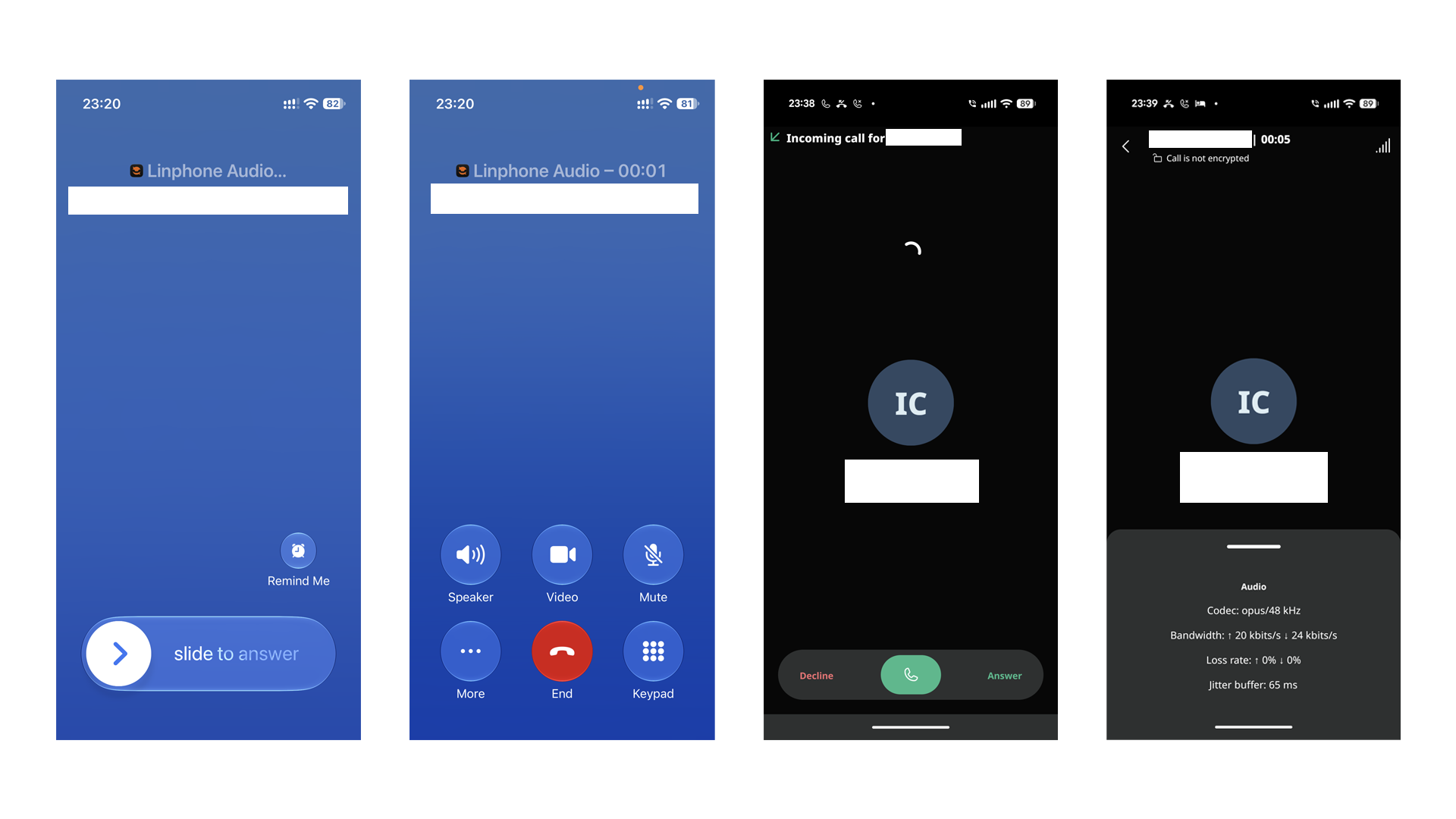
Back in 2022, I wrote a post about using an EC20 module with Asterisk and FreePBX for SMS forwarding and VoIP. The setup could already route calls from the SIM card in the EC20 to a SIP client, but the post ended with one fairly serious usability issue: the SIP client on my phone had to stay running. Otherwise, incoming calls could not reach the client, and the caller would hear a busy tone. At the time, the only easy solution I found was Zoiper Push Proxy, which was not free.
A few years later—with the rise of agentic LLMs (well, sort of)—I finally came back to this unfinished project. After spending an evening talking to Codex, I ended up with the following setup: self-host Flexisip on a public VPS and use it as both a SIP Push Gateway and an RTP relay in front of Issabel/Asterisk, then fork Linphone Android, replace its Firebase project with one of my own, and rebuild the app.
Why Regular SIP Clients Miss Calls in the Background
When a traditional SIP client starts, it sends a REGISTER request to tell the server, “You can currently find this extension at this IP address, port, or TCP connection.” When a call comes in, Asterisk sends the INVITE to the corresponding Contact.
This works well for a desk IP phone because it stays powered on and registered to the PBX. On Android, however, background processes are restricted, while NAT mappings on mobile networks and home routers eventually expire. As a result, the connection may stop working after the app is swiped away or the network changes. Even when the client uses TCP/TLS, maintaining a connection indefinitely consumes more battery and still does not guarantee that data can reach the app after Android reclaims its process.
SIP Push adds another proxy layer that can retain SIP registration information and call the phone platform’s push service. With the Android setup in this post, the flow roughly looks like this:
- Linphone obtains a registration token for the current app instance from FCM;
- When Linphone registers the SIP account, it places parameters such as
pn-provider,pn-param, andpn-pridin the Contact; - Flexisip forwards the
REGISTERto Asterisk for authentication, while remembering the phone’s original Contact and FCM parameters; - After the phone goes to sleep, Asterisk still sends the extension’s
INVITEback to Flexisip; - When the PBX receives a call, it passes it to Flexisip. Flexisip sees that the mobile client needs to be woken and sends a push through FCM;
- Android starts Linphone, the client restores its SIP connection, and Flexisip delivers the original incoming call.
One detail is particularly easy to miss: FCM credentials belong to an Android application, not to a SIP server. The Google Play version of Linphone uses Linphone’s official package name, signing key, and Firebase project. Even if it includes its FCM token in the SIP Contact, my server does not have permission to send messages through Linphone’s Firebase project. To fully self-host Push, the client and server therefore need to use the same Firebase project under my control.
The Push Services Built into Zoiper and Linphone
Zoiper’s official documentation describes its Push service as a proxy between the SIP client and the service provider. In addition to SIP signaling, it can optionally relay RTP to work around NAT and one-way audio. The setup is certainly convenient and comes with a seven-day trial, but its product page currently lists both the Android and iOS versions at EUR 2.49 per month (as of the time of writing; this may change). It is a good fit for someone who does not want to maintain a server, but I would still rather keep the entire call path under my own control.
Linphone itself is open source and can sign in to arbitrary third-party SIP accounts. However, the official Linphone FAQ explicitly says that Push in the store-distributed mobile app is enabled only for Linphone accounts; third-party SIP accounts do not receive Push by default. Organizations can contact Linphone to purchase the corresponding service. This is not a technical limitation of Linphone: the Linphone Android source already integrates Firebase, and the official documentation explains that users with their own Push server can replace app/google-services.json. The Flexisip Push Gateway, developed by the Linphone team, can also proxy a third-party SIP server behind it.
I could not find a store-distributed client that was simultaneously free, ready to use, able to connect to any self-hosted SIP server, and reliable at receiving calls after the app process had been reclaimed. I therefore settled on Flexisip plus a custom Linphone build.
Final Network Topology
Rather than exposing Issabel’s SIP port directly to the Internet, I built a WireGuard tunnel between a public VPS and my two Issabel servers. The phone connects only to Flexisip on the public VPS:
                                  ┌──────── Google FCM ────────┐
                                  │                            │
Android Linphone ── TLS 5061 ──> Flexisip on public VPS ── Push ┘
       │                           │
       │ RTP 10000-10099           │ SIP + RTP over WireGuard
       └──────────────────────────>│
                                   ▼
                           Issabel / Asterisk 16
                                   │
                                   ▼
                         chan_quectel / EC20 / SIM
In this topology:
- Only Flexisip’s
5061/TCPand a small range of RTP UDP ports are exposed publicly; - Flexisip forwards SIP requests to Issabel’s PJSIP port over WireGuard;
- Extension passwords are still authenticated by Asterisk, so Flexisip does not maintain a second user database;
- RTP from the phone first reaches MediaRelay on the VPS, then travels to Issabel over WireGuard;
- I do not need to expose SIP or RTP ports on my home public IP.
My deployment uses Asterisk 16.28, Flexisip 2.6.1, and Linphone Android 6.2.7. Docker was already installed on the VPS host, and the Flexisip container is built from debian:trixie-slim.
Preparing a PJSIP Extension on Issabel
First, create a PJSIP extension in Issabel/FreePBX. I recommend creating a dedicated extension for the mobile client instead of reusing one that is already attached to an IP phone. In addition to the username and password, these were the important settings in my deployment:
[301](+type=endpoint)
direct_media=no
rtp_symmetric=yes
force_rport=yes
rewrite_contact=no

[301](+type=aor)
support_path=no
default_expiration=604800
maximum_expiration=604800
remove_existing=yes
remove_unavailable=no
qualify_frequency=0
Place these overrides in /etc/asterisk/pjsip_custom_post.conf; do not edit the main configuration generated by FreePBX. Replace 301 with your own extension number. After applying the configuration, verify the effective runtime values rather than trusting the generated file alone:
asterisk -rx 'pjsip show endpoint 301'
asterisk -rx 'pjsip show aor 301'
Here is what some of these settings do:
direct_media=nokeeps media flowing through the server instead of making the two endpoints exchange RTP directly through complicated NAT;rewrite_contact=noprevents Asterisk from damaging the Contact already rewritten by Flexisip;qualify_frequency=0prevents Asterisk from marking the extension unavailable simply because a sleeping phone does not answer an OPTIONS probe;- The long expiration keeps the registration on the backend while the phone sleeps;
remove_existing=yesis suitable when one extension is bound to a single phone. Supporting multiple simultaneously ringing devices requires a different design.
Flexisip officially recommends that the backend support RFC 3327 Path, so I initially set support_path=yes. However, the REGISTER sent by the stock Linphone Android 6.2.7 client did not declare Supported: path, while Flexisip added a Path header. This caused Asterisk 16 to return 420 Bad Extension:
Invalid modifications made to REGISTER request by intervening proxy
After changing the AOR to support_path=no, registration finally followed the expected sequence: 401 Unauthorized → REGISTER with Digest authentication → 200 OK. In this deployment, the Contact saved by Asterisk already points to Flexisip over WireGuard and retains the CtRt... parameter, so requests can still return through the proxy without relying on Path.
Creating a Firebase Project
Next, create a project in the Firebase Console and add an Android app. Its package name must exactly match the APK that will be built later. I used me.sparktour.sippush: this avoids replacing the store-distributed Linphone app and gives my Firebase configuration its own application identity.
Two configuration files must be obtained for completely different purposes:
- The Android app’s
google-services.json(Firebase Project → Project settings → General → Android App → Download). Place it atapp/google-services.jsonin the Linphone source tree. My corresponding change is available in this commit; - The service-account JSON that Flexisip uses to call the FCM HTTP v1 API (
Firebase Project → Project settings → Service accounts → Firebase Admin SDK → Generate new private key). This file stays on the server only.
google-services.json is client configuration and is expected to be packaged into the APK. The service-account JSON, on the other hand, contains a private key and must not be published. Also record the Firebase project’s numeric Project Number: it must match both firebase-service-accounts in the Flexisip configuration and pn-param in the client’s REGISTER request.
Forking and Modifying Linphone Android
I created a branch from the official repository’s stable 6.2.7 tag. I did not rebuild liblinphone; the project continued to download the prebuilt Linphone SDK. The actual build used Java 21, Android SDK 37, and Linphone SDK 5.5.21.
First, change the package name in app/build.gradle.kts:
val packageName = "me.sparktour.sippush"
val useDifferentPackageNameForDebugBuild = false
Then replace this file with the one downloaded from Firebase:
app/google-services.json
That alone is not enough. The Linphone Android changelog explains that, starting with 6.0.4, Push is restricted for third-party SIP accounts. If the domain is not on the allowlist, the account setup screen disables Push. Change app/src/main/assets/assistant_third_party_default_values as follows:
<entry name="push_notification_allowed" overwrite="true">1</entry>
Then add the SIP domain under [net] in app/src/main/assets/linphonerc_default:
push_notification_domains=sippush.sparktour.me
If one APK needs to connect to multiple Flexisip identity domains, separate them with commas:
push_notification_domains=sippush.sparktour.me,sippush-cu.sparktour.me
linphonerc_default is copied only on the first installation. To make sure an in-place APK upgrade also picks up newly added domains, I merged the required domains into the existing configuration after LinphoneApplication initializes it:
val requiredPushDomains = arrayOf(
    "sippush.sparktour.me",
    "sippush-cu.sparktour.me"
)
val configuredPushDomains = corePreferences.pushNotificationCompatibleDomains
if (!configuredPushDomains.toSet().containsAll(requiredPushDomains.toSet())) {
    corePreferences.pushNotificationCompatibleDomains =
        (configuredPushDomains + requiredPushDomains).distinct().toTypedArray()
}
This allows a new APK to be installed over the previous build without deleting existing accounts, while preserving any additional compatible domains added by the user.
Finally, build the app:
export JAVA_HOME=/path/to/jdk-21
export ANDROID_HOME=/path/to/Android/sdk
./gradlew assembleDebug
For a quick test, install the debug APK first:
adb install -r app/build/outputs/apk/debug/linphone-android-debug-*.apk
Running Flexisip with Docker
I placed all server-side files under /opt/docker/flexisip. The directory roughly looks like this:
/opt/docker/flexisip/
├── compose.yaml
├── Dockerfile
├── belledonne-container.sources
├── flexisip.conf
├── routes.conf
├── domain-registrations.conf
├── firebase/
│   └── service-account.json
└── logs/
The Debian 13 container uses Belledonne’s trixie repository and pins the Flexisip version:
FROM debian:trixie-slim

ARG DEBIAN_FRONTEND=noninteractive

COPY belledonne-container.sources /etc/apt/sources.list.d/belledonne.sources

RUN apt-get update \
    && apt-get install -y --no-install-recommends ca-certificates curl gnupg \
    && curl -fsSL https://download.linphone.org/snapshots/debian/keyring.gpg \
       | gpg --dearmor -o /usr/share/keyrings/belledonne-archive-keyring.gpg \
    && apt-get update \
    && apt-get install -y --no-install-recommends bc-flexisip=2.6.1-1 \
    && rm -rf /var/lib/apt/lists/*

ENTRYPOINT ["/opt/belledonne-communications/bin/flexisip"]
CMD ["--server", "proxy"]
The contents of belledonne-container.sources are:
Types: deb
URIs: https://download.linphone.org/snapshots/debian/
Suites: trixie
Architectures: amd64
Components: stable
Signed-By: /usr/share/keyrings/belledonne-archive-keyring.gpg
The Compose service uses host networking because Flexisip must send and receive SIP and RTP on both the public interface and the WireGuard interface:
services:
  flexisip:
    build:
      context: .
      dockerfile: Dockerfile
    image: local/flexisip:2.6.1-trixie
    container_name: flexisip
    network_mode: host
    restart: unless-stopped
    init: true
    security_opt:
      - no-new-privileges:true
    volumes:
      - ./flexisip.conf:/etc/flexisip/flexisip.conf:ro
      - ./routes.conf:/etc/flexisip/routes.conf:ro
      - ./domain-registrations.conf:/etc/flexisip/domain-registrations.conf:ro
      - /path/to/tls:/etc/flexisip/tls:ro
      - ./firebase/service-account.json:/etc/flexisip/firebase/service-account.json:ro
      - ./logs:/var/opt/belledonne-communications/log/flexisip
    command:
      - --server
      - proxy
Main Flexisip Configuration
The following is a shortened version of the single-backend configuration used in this post. Replace <PUBLIC_IP>, <FCM_PROJECT_NUMBER>, <vps wireguard ip>, <vps wireguard CIDR>, and the other specific IP values with the ones from your own deployment:
[global]
aliases=localhost sippush.sparktour.me
transports=sips:sippush.sparktour.me:5061;maddr=<PUBLIC_IP> sip:<vps wireguard ip>:5080;transport=udp;network=<vps wireguard CIDR>/24
tls-certificates-check-interval=1
tls-certificates-file=/etc/flexisip/tls/cert.pem
tls-certificates-private-key=/etc/flexisip/tls/key.pem
log-level=message

[module::Authentication]
enabled=false

[module::Registrar]
enabled=true
reg-domains=*
reg-on-response=true
db-implementation=internal
max-expires=604800

[module::Router]
filter=(is_request && (request.uri.params contains 'doroute' || request.uri.params contains 'CtRt')) || is_response
use-global-domain=true
fork-late=true

[module::PushNotification]
enabled=true
apple=false
firebase=true
firebase-service-accounts=<FCM_PROJECT_NUMBER>:/etc/flexisip/firebase/service-account.json

[module::ContactRouteInserter]
enabled=true
insert-domain=true

[module::MediaRelay]
enabled=true
sdp-port-range=10000-10099
max-calls=10
force-public-ip-for-sdp-masquerading=false

[module::Forward]
enabled=true
routes-config-path=/etc/flexisip/routes.conf
Some of the important settings are:
- Disabling
Authenticationmeans that Flexisip does not validate passwords itself; authentication is delegated to Asterisk behind it; reg-on-response=truemakes Flexisip save the mobile Contact only after Asterisk successfully accepts theREGISTER;ContactRouteInserterrewrites the Contact seen by Asterisk so that it points back to Flexisip and includes return-routing parameters;fork-late=truelets Flexisip deliver a waitingINVITEto a newly registered Contact after Push wakes the app;MediaRelayforces audio through the public VPS;- This setup uses an in-memory Registrar. A Flexisip restart loses registrations and FCM tokens, so the app must be opened once to send another
REGISTER. For a genuinely highly available deployment, consider a persistent store such as Redis.
routes.conf explicitly forwards this SIP identity domain to Issabel over WireGuard, preventing the domain’s public DNS record from resolving back to Flexisip itself:
<sip:<PBX IP>:5066;transport=udp> is_request && (request.uri.domain == 'sippush.sparktour.me')
I also ran into a Flexisip 2.6.1 compatibility issue: the Contact already contained an instance-specific CtRt... parameter, but the returning request did not reliably restore it as doroute as shown in the official example. The Router filter above therefore matches both doroute and CtRt, and I temporarily enabled use-global-domain=true. This lets the current version find the Contact in its in-memory Registrar, but it also means usernames cannot be reused across different SIP domains. If multiple backends are deployed, their extension numbers must be globally unique.
Start the service after finishing the configuration:
docker compose config --quiet
docker compose up -d --build
docker compose logs -f flexisip
Adding the Account in Linphone
After building and installing the APK, choose the option to add a third-party SIP account:
| Field | Value |
|---|---|
| SIP identity | sip:301@<SIP Push Domain> |
| Auth username | 301 |
| Password | The extension password configured in Issabel |
| Domain | <SIP Push Domain> |
| Transport | TLS |
| Outbound proxy | sips:<SIP Push Domain>:5061 |
| Push notification | Enabled |
During a successful registration, the Flexisip and Asterisk logs should show one Digest authentication exchange:
REGISTER
401 Unauthorized
REGISTER with Authorization
200 OK
The Contacts saved on both sides must also be inspected. The original mobile Contact in Flexisip should include:
pn-provider=fcm
pn-param=<FCM_PROJECT_NUMBER>
pn-prid=<DEVICE_FCM_TOKEN>
pn-silent=1
pn-prid is effectively the device’s Push address and should be redacted before sharing logs. The Contact saved by Asterisk should point to Flexisip’s WireGuard address and retain CtRt.... If Asterisk strips these parameters, the UI may still say that registration succeeded, but incoming calls will not be able to return through the Push Gateway correctly.
Test Results
I tested the setup in the following order, which avoided having to debug SIP, Push, and RTP all at once:
- Test TLS registration with the stock Linphone client first and confirm
401 → 200; - Keep the app in the foreground and test calls between extensions, inbound and outbound external calls, DTMF, and hangup;
- Capture RTP on both the public and WireGuard interfaces to confirm that two-way audio passes through the VPS;
- Install the APK containing my Firebase configuration and inspect the three
pn-*parameters in theREGISTERContact; - Put the app in the background, lock the phone, and test an incoming call;
- Swipe the app away from Recents and repeat the incoming call test;
- Repeat the tests over Wi-Fi, mobile data, and after switching between the two networks.
During one real call to a Pixel, the Flexisip log showed that the INVITE matched an FCM Contact and that the Push module returned 110 Push sent. It received 180 Ringing about 428 milliseconds later, and answering the call produced normal two-way audio. Before modifying the app, calls would not ring after it had been swiped away from Recents. After rebuilding the APK, installing it over the old version, and registering again, that scenario worked correctly.
iOS: Stock Linphone plus Linphone’s Own Push Service
The Android part had to be rebuilt because FCM credentials belong to the app itself. iOS is even more restrictive: the PushKit token is tied to the Bundle ID and signature of the official Linphone in the App Store, so my server can never obtain a certificate that is allowed to push to it, and building my own iOS client would require an Apple Developer Program membership and the CallKit entitlements that come with it. After coming across easonjoo/dontmove-kit on social media, I took a different route for iOS: keep the stock Linphone as the client and let Linphone’s own servers do the push.
The Linphone team provides a REST endpoint for exactly this, described in Sending push notification to Linphone mobile Apps. A third-party SIP server POSTs the pn-provider, pn-param, and pn-prid values that the phone put in its REGISTER, and Linphone’s server sends the VoIP Push to APNs on your behalf. The request needs an API key; I obtained a free one with my linphone.org account at subscribe.linphone.org. Note that the key is bound to the source IP it was created from. My VPS also has IPv6, and requests that went out over IPv6 by default were answered with 401; forcing IPv4 fixed it.
After adding a third-party SIP account in the official iOS Linphone (I used 6.2.2), Push notifications can be enabled directly in the account settings. Once enabled, the REGISTER Contact carries:
pn-provider=apns
pn-param=ABCD1234.org.linphone.phone.voip&remote
pn-prid=<VoIP token>:voip&<remote token>:remote
pn-silent=1
pn-call-str=IC_MSG
pn-msg-str=IM_MSG
pn-prid contains two tokens, one for PushKit VoIP pushes and one for regular remote notifications. Flexisip picks the token based on the request that triggered the push: INVITE uses the VoIP token, NOTIFY and MESSAGE use the remote token.
On the Flexisip Side: external-push-flexiapi and a Small Routing Service
Flexisip 2.6 can delegate push delivery to Linphone’s FlexiAPI natively, and it only takes three lines:
[global::flexiapi]
url=https://subscribe.linphone.org
api-key=<LINPHONE_API_KEY>

[module::PushNotification]
external-push-flexiapi=true
There is a catch, though: with external-push-flexiapi enabled, Flexisip hands every push to the external service, including Android’s FCM. Linphone’s servers do not have the service account of my Firebase project, so the custom Android build would stop receiving pushes. I did not want to run a second Flexisip just for this, so I wrote push_router.py, a Python routing service of under two hundred lines that lives in the same compose file as Flexisip:
Flexisip ── FlexiAPI JSON ──> push_router.py (127.0.0.1:8090)
                                  ├── pn_provider = apns / apns.dev ──> subscribe.linphone.org (IPv4 forced, with the Linphone API key)
                                  └── pn_provider = fcm ──────────────> flexisip_pusher + my own Firebase service account
The FlexiAPI request that Flexisip emits is a plain JSON object: pn_provider, pn_param, pn_prid, type (call, message, or background), and call_id, plus an x-api-key header. The router forwards APNs requests to Linphone unchanged. For FCM it runs Flexisip’s bundled flexisip_pusher locally with my own service account, mapping type to --apple-push-type as call → PushKit, message → RemoteWithMutableContent, and background → Background.
Because global::flexiapi/url must be HTTPS, I added an internal location to the Nginx already running on the VPS. It only accepts connections from loopback and the VPS’s own IPv4 address, proxies to the router, and is protected by a separately generated random internal key. The real Linphone API key only lives in the router’s secret file and never appears in the Flexisip configuration:
location = /flexiapi-router/api/push_notification {
    allow 127.0.0.1;
    allow ::1;
    allow <PUBLIC_IP>;
    deny all;

    proxy_pass http://127.0.0.1:8090/api/push_notification;
    proxy_http_version 1.1;
    proxy_set_header Host 127.0.0.1;
    proxy_connect_timeout 5s;
    proxy_read_timeout 30s;
}
The Flexisip configuration then becomes:
[global::flexiapi]
url=https://sippush.sparktour.me/flexiapi-router
api-key=<INTERNAL_RANDOM_KEY>

[module::PushNotification]
enabled=true
apple=false
firebase=true
firebase-service-accounts=<FCM_PROJECT_NUMBER>:/etc/flexisip/firebase/service-account.json
external-push-flexiapi=true
register-wakeup-interval=30
register-wakeup-threshold=50
enable-message-summaries-pn=false
About the last three lines:
register-wakeup-intervalandregister-wakeup-thresholdmake Flexisip send a background push once a registration has passed half of its lifetime, so the app wakes up and re-REGISTERs. The official iOS client requests a 3600-second expiry by default, and without this mechanism the binding would expire after an hour. I later changed the expiry to 604800 seconds in the iOS account settings, but leaving this in does no harm.enable-message-summaries-pn=falsedisables pushes triggered by voicemail indication (MWI). The story behind that is in the next section.
The router shares the same image as Flexisip, runs with a read-only root filesystem and all capabilities dropped, and its healthcheck only probes /healthz.
With this setup, a call from the PBX to the iPhone shows up in the logs as follows: Flexisip receives the INVITE and answers 110 Push sent, the router logs provider=apns type=call, and Linphone’s FlexiAPI returns success. About three seconds later the iPhone wakes up and re-REGISTERs, followed by 180 Ringing and 200 OK, and the call is answered from the CallKit screen.
iOS Push Dying After Standby: a Client Bug and a Flexisip Patch
Once the chain above was working, a new problem appeared quickly: leave the iPhone alone for a while and incoming calls stop ringing, then open the app and everything works again. The Flexisip log and the iPhone’s debug log eventually revealed two separate things stacked on top of each other.
Part One: a 25-Second Registration Loop Caused by MWI NOTIFY
Issabel generates mailboxes=<ext>@device for every PJSIP extension, so Asterisk sends an unsolicited NOTIFY Event: message-summary after every successful registration. Flexisip’s enable-message-summaries-pn defaults to true, and every such NOTIFY produces a remote-notification push. When the iPhone receives it, the Notification Service Extension starts a shared core to fetch the “new message”, times out after 25 seconds, and re-REGISTERs before exiting, so Asterisk sends another NOTIFY, and the cycle repeats. The push-router log showed exactly 24 apns type=message entries every 10 minutes. This loop is not what breaks incoming calls, but it burns APNs quota and battery for nothing. Since I do not use voicemail, turning off enable-message-summaries-pn is enough; the NOTIFY itself is still forwarded, it just no longer wakes the phone.
Part Two: a REGISTER Missing One Label After a Cold Start
The thing that actually breaks calls is different. Every time the official iOS Linphone is cold-started by a VoIP push, the SDK restarts its core and restores the push parameters from its configuration, and at that point neither restored token carries its :voip/:remote label. Right after that, the PushKit callback delivers the VoIP token, the SDK regenerates pn-prid and immediately sends a REGISTER, and the result is:
pn-prid=<VoIP token>:voip&<remote token>
The :remote label on the second token is gone. Normally the app then forwards the labelled remote token to the core and registers once more, which repairs it, but on a cold start the app’s own CoreContext is not ready yet and that step never happens (in the linphone-iphone source this is didRegisterForRemoteNotificationsWithDeviceToken in LinphoneApp.swift, which simply returns when coreContext is nil). So the malformed REGISTER becomes the final state.
Flexisip 2.6.1 validates pn-prid strictly: when pn-param declares two services, every token must match ([^:]+):(voip|remote), otherwise InvalidPushParameters is thrown. module-pushnotification.cc catches that exception and only logs it at debug level, and production servers normally run at the message level, so nothing shows up in the log at all. From that moment on, every INVITE for this iPhone is sent only to a TLS connection that died long ago, times out with 408 after 32 seconds, and stays that way until the user opens the app and registers again.
I checked the master branches of both Flexisip and liblinphone on GitHub, and the relevant code is unchanged on both sides, so upgrading does not help. The official app also forces remote push back on at every start, so the configuration workaround of keeping only the VoIP token is not an option either. With “the client must be the official app” as a hard requirement, the only thing left was to make Flexisip a little more forgiving.
The Temporary Patch
The patch only touches parsePushParams in src/pushnotification/rfc8599-push-params.cc. For multi-token values it switches to a regex that allows the label to be omitted, and a token without a label is assigned only when there is exactly one unlabelled token and exactly one declared service that has not been claimed yet. It logs a warning when it does so:
'pn-prid' token without service label, assuming service 'remote' (client bug workaround)
Two unlabelled tokens are still rejected, and single-token and well-formed values behave exactly as before. To build on Debian trixie without depending on gitlab.linphone.org (which is so slow that cloning the submodules is practically impossible), I also changed two build settings: use the system mbedtls 3.6 instead of the external/mbedtls submodule, and disable decaf, which the proxy does not need. bctoolbox additionally needs to skip mbedtls_threading_set_alt when the system mbedtls uses the pthread threading model. The build only enables what the proxy needs, with Presence, Redis, SNMP, SOCI, Transcoder, Voicemail, RegEvent, and B2BUA turned off. The result is 4.4 MB and only depends on Debian’s own mbedtls, nghttp2, OpenSSL, and systemd libraries at runtime.
The patches, the Dockerfile used for the build, and the compiled amd64 binaries are on GitHub:
If you would rather not compile it yourself, download flexisip-2.6.1-patched-trixie-amd64.tar.gz from the Releases page and extract it into the container’s /, which gives you /opt/belledonne-communications. The runtime image Dockerfile looks roughly like this:
FROM debian:trixie-slim

ARG DEBIAN_FRONTEND=noninteractive

RUN apt-get update \
    && apt-get install -y --no-install-recommends \
       ca-certificates curl python3 python3-google-auth python3-requests \
       libcap2 libmbedcrypto16 libmbedtls21 libmbedx509-7 \
       libnghttp2-14 libssl3t64 libstdc++6 libsystemd0 libzstd1 zlib1g \
    && rm -rf /var/lib/apt/lists/*

ADD flexisip-2.6.1-patched-trixie-amd64.tar.gz /

RUN mkdir -p /var/opt/belledonne-communications/log/flexisip /etc/flexisip \
    && ldconfig \
    && /opt/belledonne-communications/bin/flexisip --version

ENTRYPOINT ["/opt/belledonne-communications/bin/flexisip"]
CMD ["--server", "proxy"]
python3-google-auth is needed by the script Flexisip uses to obtain Firebase v1 access tokens, and python3-requests is for the routing service. Switching images clears the in-memory Registrar: Android reconnects on its own, while the iPhone needs the app opened once to register again.
After the switch I made three test calls. First I called the iPhone and declined; the malformed REGISTER and the patch’s warning appeared in the log right away. Then I called again: 110 Push sent, ringing, and the call was answered. Finally I left the iPhone locked and called once more; the INVITE hit exactly that malformed binding, the push went out as usual, and ringing, answering, and hanging up all worked. The 24 type=message pushes every 10 minutes were gone as well. I have also reported the issue upstream to Flexisip and hope it gets fixed within the next few releases.
References
- Flexisip Push Gateway
- Flexisip Push Notifications
- Linphone Android source and Firebase build instructions
- Linphone FAQ: third-party SIP accounts and Push
- Linphone Push notification configuration
- Zoiper Push Proxy
- Firebase Cloud Messaging for Android
- Asterisk res_pjsip configuration reference
- Sending push notification to Linphone mobile Apps
- Linphone FlexiAPI documentation
- Flexisip source: rfc8599-push-params.cc
- Linphone iOS source
- https://github.com/easonjoo/dontmove-kit